ROAS Formula: How to Calculate Return on Ad Spend
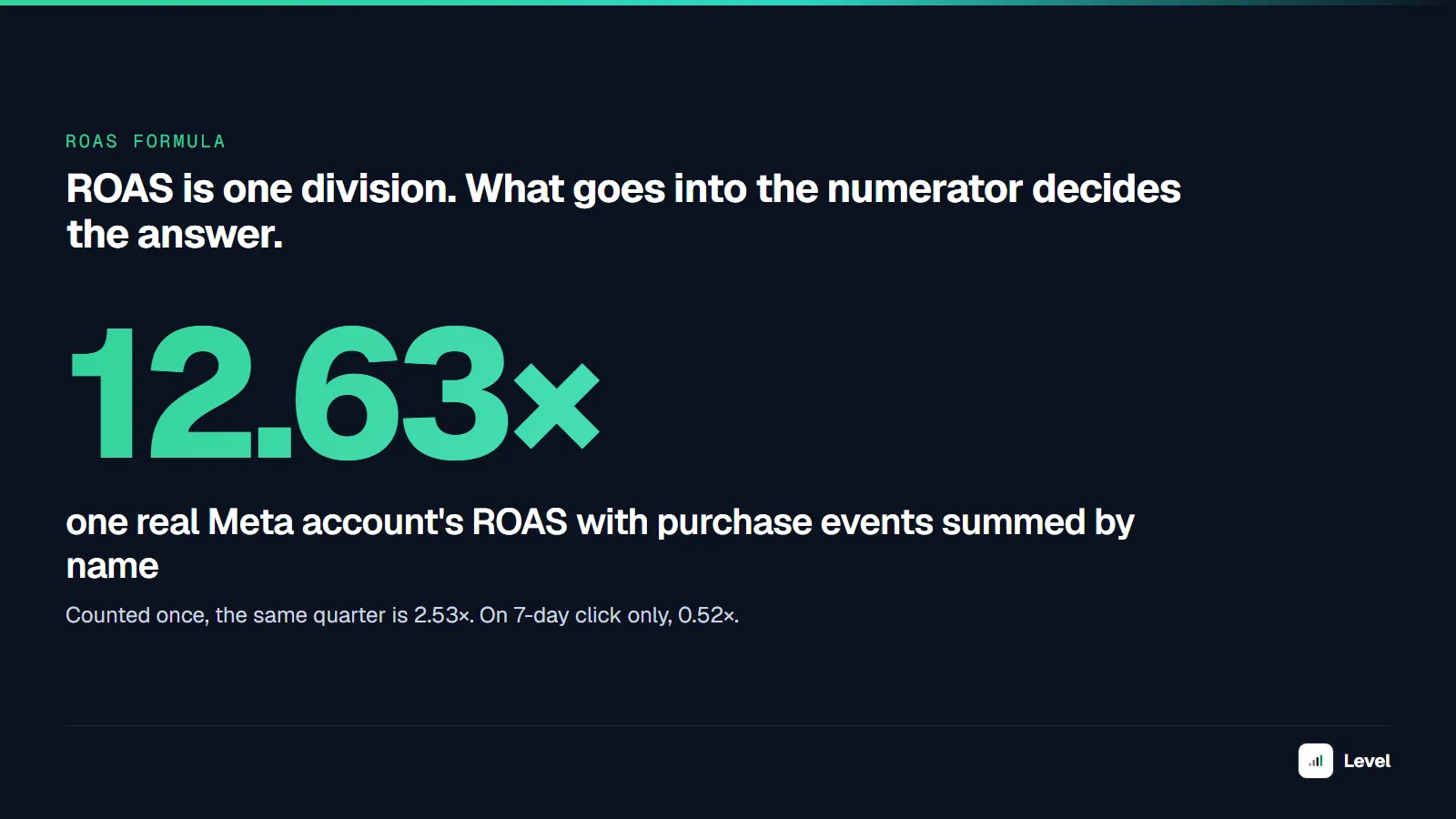
ROAS is one division. The hard part is everything that goes into the numerator before you divide — and in one real ad account, those choices moved the answer from 0.5× to 12.6× for the same quarter of spend.

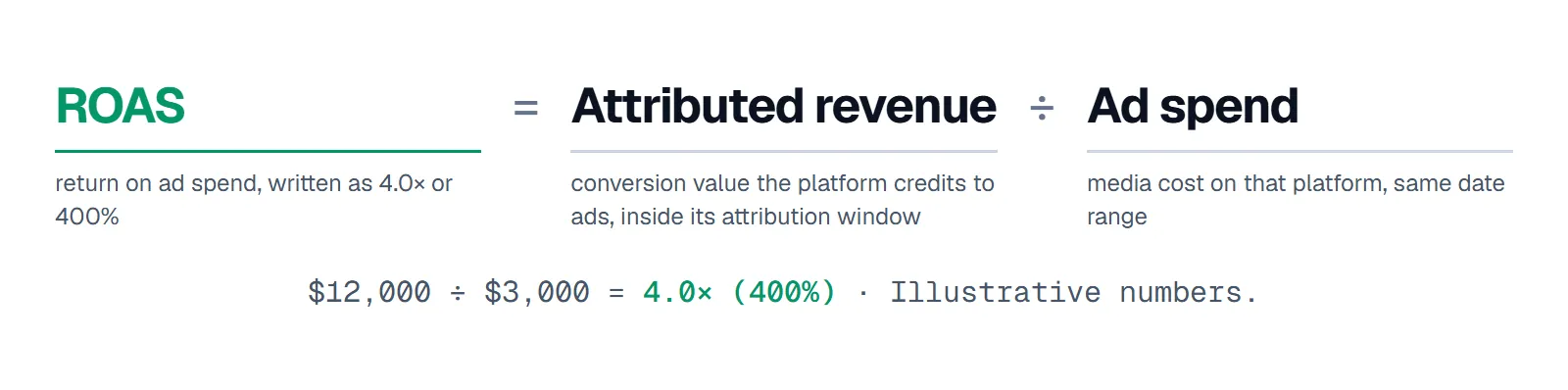
ROAS (return on ad spend) = revenue attributed to your ads ÷ what you spent on those ads. Spend $3,000 on Meta, get $12,000 of purchases the platform credits to those ads, and your ROAS is 4.0 — written as 4.0×, 4:1, or 400%. All four mean the same thing: every dollar of ad spend came back as four dollars of revenue.
That is the whole formula. What makes ROAS hard is the numerator. "Revenue attributed to your ads" is not a fact you look up; it is the output of an attribution setting, a list of conversion events, and a date range — each of which someone chose. While pulling real numbers for this article from one DTC brand's ad account in Level, we got answers from 0.52× to 12.63× for the same quarter of the same spend. Below: the formula, how to calculate it on every platform, and the three inputs that move it.
Key takeaways
- ROAS = attributed revenue ÷ ad spend, over the same date range and the same platform. 4.0× = 4:1 = 400%.
- ACoS (Amazon's metric) is the inverse: ACoS = 1 ÷ ROAS. A 25% ACoS is a 4.0× ROAS.
- The attribution setting changes ROAS more than most optimizations do: in one Meta account, the default setting reported 2.53× while 7-day click alone reported 0.52× for the same quarter.
- Meta returns one purchase under several event names. Sum them and ROAS inflates — 5× in the account we checked.
- ROAS ignores margin. Compare it to your break-even ROAS (1 ÷ contribution margin), not to an industry "good ROAS."
What is ROAS?
ROAS stands for return on ad spend: the revenue an ad platform credits to your ads for every dollar you spent on them. In marketing it is the standard efficiency metric for paid media — Meta reports it as "Purchase ROAS," Google Ads as "Conv. value / cost," Amazon as its inverse, ACoS. A ROAS of 4 means $4 of attributed revenue per $1 of spend.
ROAS measures media efficiency, not profit. It leaves out product cost, shipping, fees and everything you spend beyond media, which is why the same ROAS can be profitable for one brand and a loss for another.
The ROAS formula
ROAS = attributed revenue ÷ ad spend
- Attributed revenue is the conversion value the ad platform credits to your ads inside its attribution window — Meta's "purchase conversion value," Google Ads' "Conv. value." It is the platform's claim, not your order system's total.
- Ad spend is media cost on that platform for the same date range. Agency fees, creative production, and tools are not in it — that is what makes ROAS a media metric rather than a profit metric.
Worked examples
| Campaign | Ad spend | Attributed revenue | ROAS | As % |
|---|---|---|---|---|
| Prospecting, Meta | $5,000 | $9,000 | 1.8× | 180% |
| Retargeting, Meta | $1,200 | $7,800 | 6.5× | 650% |
| Shopping, Google | $3,000 | $12,000 | 4.0× | 400% |
| Brand search, Google | $800 | $9,600 | 12.0× | 1,200% |
| Total | $10,000 | $38,400 | 3.84× | 384% |
Illustrative numbers. Two things to notice. Account-level ROAS is total revenue ÷ total spend (3.84×), not the average of the campaign ROAS values (6.1×) — averaging ratios overweights small campaigns. And the campaigns with the highest ROAS (brand search, retargeting) are mostly harvesting demand that other campaigns created; a high ROAS there is not a reason to move budget into them.
Calculate ROAS on your own numbers
Enter your spend and the revenue the platform attributes to it. Add your contribution margin to see break-even ROAS and what is left after ad spend. To keep it at hand, bookmark the standalone ROAS calculator: same inputs, plus the formulas and a worked example on one page.
ROAS calculator
ROAS = attributed revenue ÷ ad spend · break-even ROAS = 1 ÷ contribution margin
- ROAS
- 4.00× 400% · 4.0:1
- ACoS
- 25%
- Break-even ROAS
- 2.50×
- Profit after ad spend
- $1,800
Above break-even: each sale covers its ad cost at a 40% margin.
ROAS as a percentage, ratio and ACoS
The same number is written four ways, depending on the platform:
| ROAS (×) | Ratio | Percentage | ACoS (Amazon) |
|---|---|---|---|
| 1.0× | 1:1 | 100% | 100% |
| 2.0× | 2:1 | 200% | 50% |
| 2.5× | 2.5:1 | 250% | 40% |
| 3.0× | 3:1 | 300% | 33% |
| 4.0× | 4:1 | 400% | 25% |
| 5.0× | 5:1 | 500% | 20% |
| 8.0× | 8:1 | 800% | 12.5% |
ACoS = 1 ÷ ROAS (ad spend ÷ ad sales). Google Ads sets Target ROAS as a percentage (400% = 4.0×); Meta and most dashboards show the multiplier.
How to calculate ROAS on each platform
- Meta Ads Manager: the "Purchase ROAS" column is already the ratio (purchase conversion value ÷ amount spent). Check the attribution setting column next to it before you compare it with anything — see below.
- Google Ads: add the "Conv. value / cost" column; that is ROAS. It includes every conversion action marked "Primary" with a value, so check that list first.
- Spreadsheet:
=revenue/spend, formatted as a number (4.0) or a percentage (400%). Sum revenue and spend first, divide once. - Across platforms: add up each platform's attributed revenue and spend and you get a "blended platform ROAS" — which double-counts every sale two platforms both claim. For a cross-channel number, use MER (total revenue ÷ total ad spend) from your store's backend instead. The MER calculator does that math, including break-even MER.
Three things that change ROAS without a single ad changing
1. The attribution setting
Attributed revenue only counts purchases that happen within a set time after someone clicked or saw an ad. Change that window and the numerator changes. Here is one real DTC ad account in Level, Meta Ads, July–September 2026 — same spend, same campaigns, same purchases:
| Attribution setting | ROAS |
|---|---|
| Account's default attribution setting | 2.53× |
| 1-day view only | 0.88× |
| 28-day click only | 0.59× |
| 7-day click only | 0.52× |
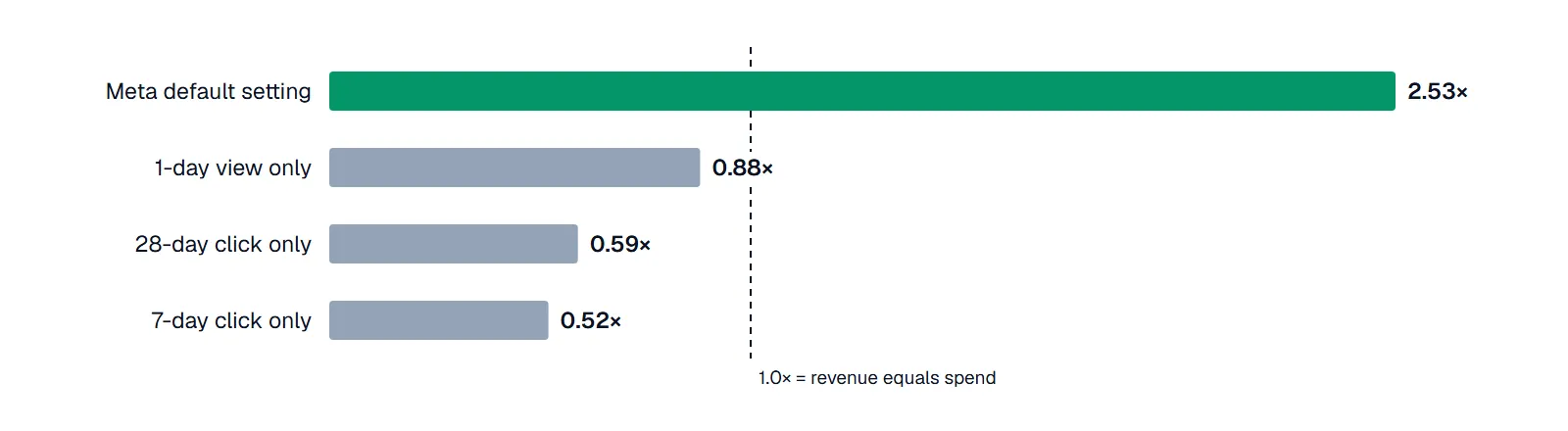
Same spend, same purchases, four attribution settings. Source: Level, anonymized DTC ad account, Meta Ads, Q3 2026.
On click-only attribution this account does not return its ad spend. On the default setting, which also credits purchases after an ad view, it returns 2.5×. Neither number is "the real ROAS" — they answer different questions. The rule is narrower and more useful: only compare ROAS figures that use the same attribution setting, and write the setting next to the number in every report. When a platform changes its default, your historical trend breaks without anything happening in the account.
2. Duplicate conversion events
Meta reports a single website purchase under several event names at once. In the account above, the same purchase value appears under purchase, omni_purchase, offsite_conversion.fb_pixel_purchase, onsite_web_purchase and onsite_web_app_purchase — five rows, identical amounts.

Summing by event name counts each purchase five times. Source: Level, same account and quarter.
Google Ads has its own version: two conversion actions tracking the same order. In the same brand's Google account, an old and a new purchase action ran side by side for about two weeks during a tracking migration, so those two weeks counted orders twice. Check which actions are set to "Primary" and whether any overlap.
3. What you leave out of "spend"
ROAS divides by media cost only. Agency fees, creative production, influencer payments, discounts given to close the sale, and the tools you pay for to run the ads all sit outside the formula. That is fine as long as everyone knows it — and it is the main reason a "good" ROAS can still lose money. ROI and MER answer the questions ROAS cannot; our ROAS vs ROI vs MER breakdown covers when to use which.
ROAS is not a constant, even at flat spend
The same account, Meta only, 13 quarters. Quarterly spend never moved by more than 14% from the lowest quarter to the highest. ROAS did:
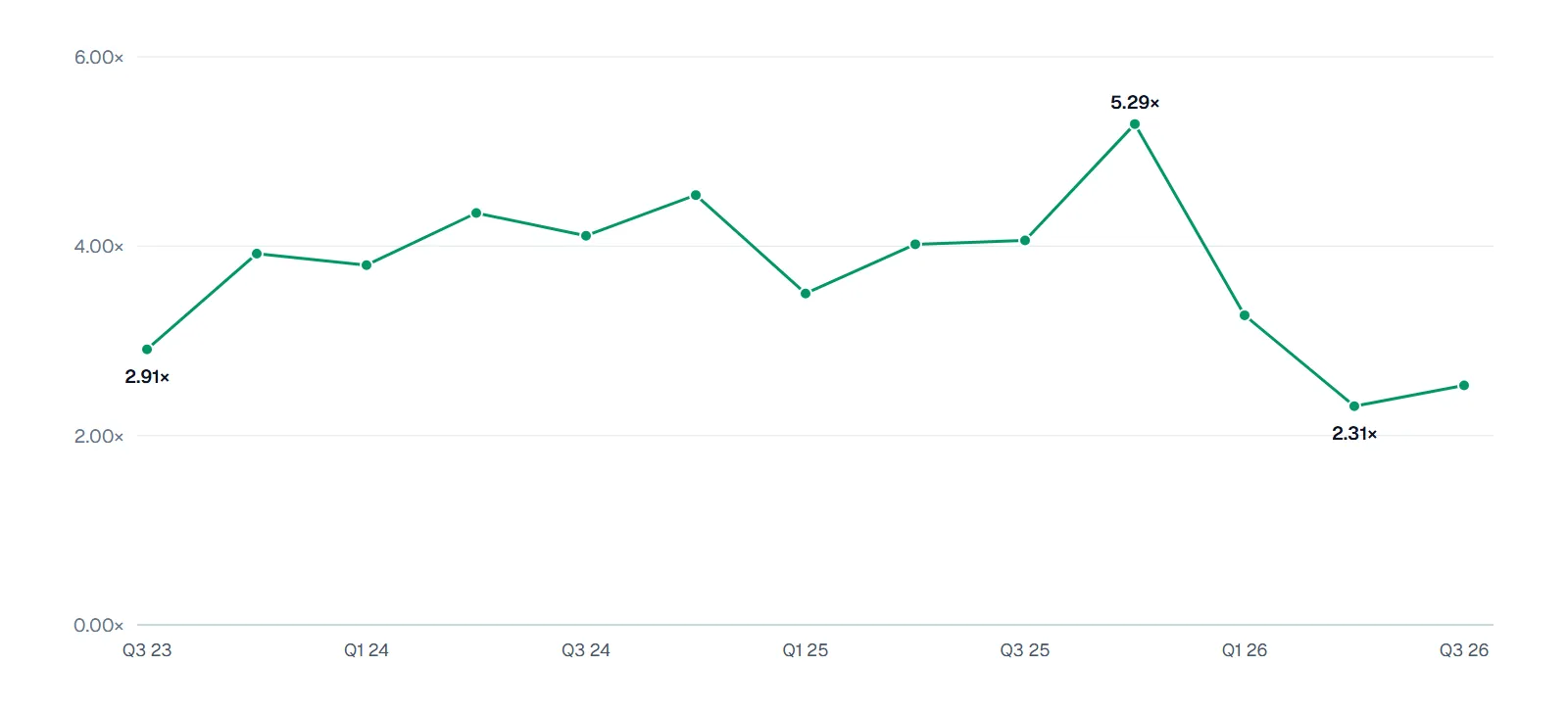
Meta ROAS by quarter at near-flat spend. Source: Level, anonymized DTC ad account, Q3 2023 – Q3 2026.
| Quarter | Meta ROAS |
|---|---|
| Q3 2023 | 2.91× |
| Q4 2023 | 3.92× |
| Q1 2024 | 3.80× |
| Q2 2024 | 4.35× |
| Q3 2024 | 4.11× |
| Q4 2024 | 4.54× |
| Q1 2025 | 3.50× |
| Q2 2025 | 4.02× |
| Q3 2025 | 4.06× |
| Q4 2025 | 5.29× |
| Q1 2026 | 3.27× |
| Q2 2026 | 2.31× |
| Q3 2026 | 2.53× |
Q4 is the high every year (holiday demand converts the same spend into more revenue); Q1 is the drop after it. A single quarter's ROAS tells you little about the account; a year-on-year comparison of the same quarter tells you much more. Set ROAS targets per season, not one number for the year.
Is your ROAS good?
ROAS alone cannot say. A 2.5× ROAS is a loss at a 30% margin and comfortable at 70%. The number to compare against is your break-even ROAS:
break-even ROAS = 1 ÷ contribution margin
| Contribution margin (after COGS, shipping, fees, returns) | Break-even ROAS |
|---|---|
| 25% | 4.0× |
| 33% | 3.0× |
| 40% | 2.5× |
| 50% | 2.0× |
| 60% | 1.67× |
| 70% | 1.43× |
Above break-even, each sale covers its ad cost; below it, you pay to sell. Our break-even ROAS guide covers which costs belong in the margin, and what is a good ROAS covers targets by margin and channel. To get break-even ROAS from your order costs, use the break-even ROAS calculator.
How we got these numbers
The real-account figures in this article come from one DTC brand's Meta Ads and Google Ads accounts connected to Level, Q3 2023 – Q3 2026. Spend and conversion values are what each platform's API reported; we did not adjust or model them. ROAS is attributed purchase value ÷ spend per quarter, counting one purchase event per platform (Meta purchase; Google's Shopping App purchase action). The attribution-window comparison uses the per-window values Meta returns alongside the default. The brand is anonymized and absolute amounts are withheld; ratios are shown as reported. One account is an example, not a benchmark — your numbers will differ.
A ROAS checklist before you report it
Name the attribution setting
Write it next to every ROAS figure ("Meta, 7-day click + 1-day view"). Never compare across settings.
Count each purchase once
One event per platform for revenue. In Meta, pick purchase or omni_purchase, not both. In Google, check which actions are Primary.
Divide totals, don't average ratios
Sum revenue and spend for the period and divide once.
Compare to break-even, not to a benchmark
1 ÷ margin is the line that matters for your business.
Check it against your backend
Platform ROAS is a claim. MER from your order system is the cross-check.
Doing these five by hand each week is where most reporting time goes. In Level, revenue is a metric you define once per account — which conversion actions count, on which platform — and every report, dashboard and alert uses that definition, so the duplicate-event error above cannot creep in. To see your own accounts counted this way, book a Level demo. The marketing KPI dashboard guide shows where ROAS sits next to the metrics that predict revenue.
FAQ
Divide the revenue your ads generated (as attributed by the ad platform) by the ad spend for the same period. $12,000 revenue on $3,000 spend is a ROAS of 4.0, or 400%.
Four dollars of attributed revenue for every dollar of ad spend. Same as 4.0× or 400%.
4.0×. ACoS is ad spend ÷ ad sales, the inverse of ROAS, so ROAS = 1 ÷ 0.25 = 4.
It breaks even at a 33% contribution margin. Above 33% margin it is profitable on a per-sale basis; below, it loses money. Compare it to 1 ÷ your margin.
No. ROAS divides revenue by ad spend. ROI divides profit by total investment, so it accounts for product cost and every other expense. A campaign can have a ROAS above 1 and a negative ROI.
Each platform credits sales to its own ads using its own attribution rules, and two platforms often both claim the same order. Shopify reports orders, not ad attribution. Compare each platform to itself over time, and use total revenue ÷ total ad spend (MER) for the cross-channel view.