White Label Reporting: What It Is, What It Costs
Every reporting vendor says "white-label." Some mean your logo on a PDF; others mean a login page on your own domain where the vendor's name never appears. The price per client differs about sixfold, and the label alone will not tell you which one you are buying.

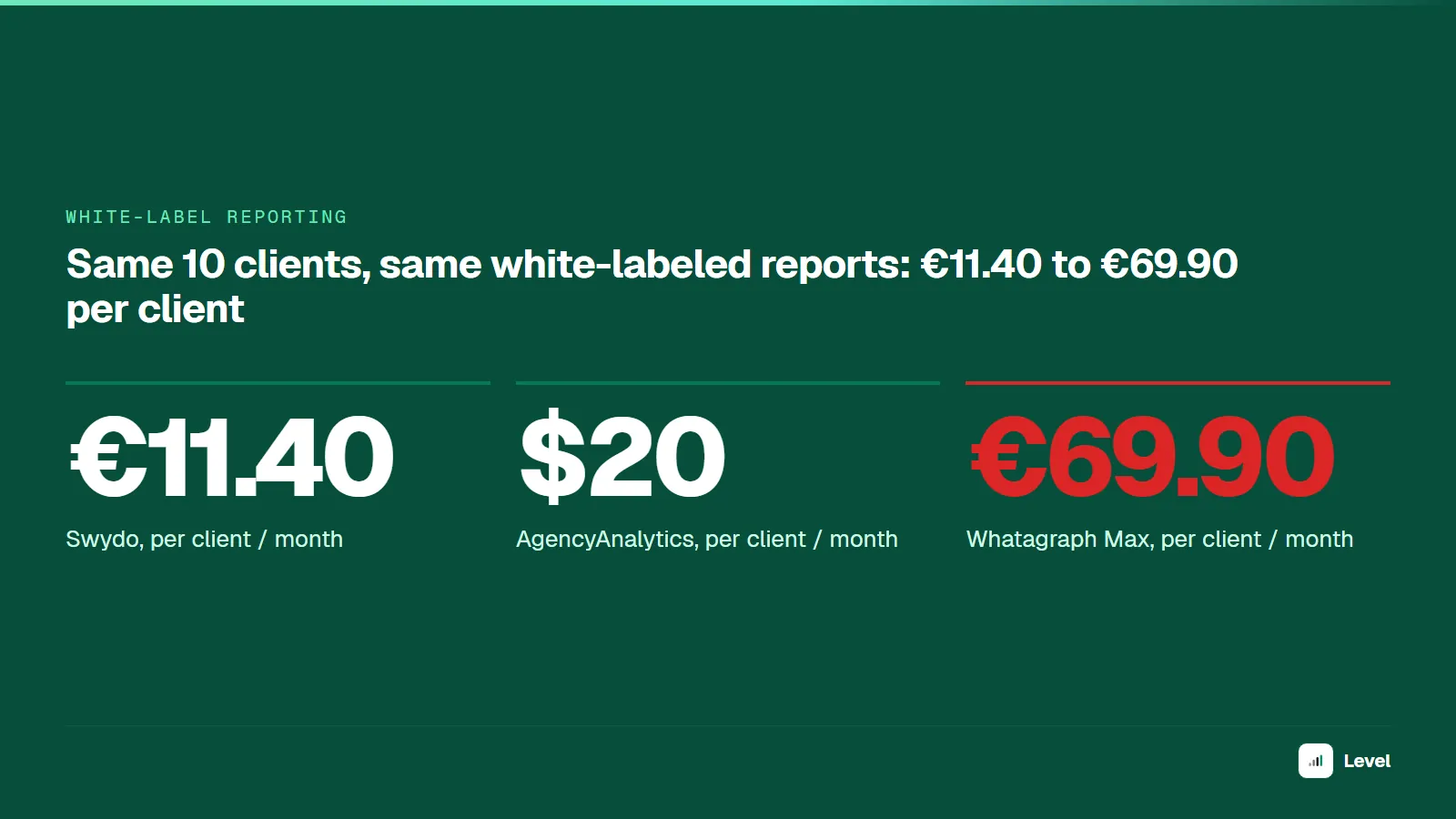
White-label reporting is client reporting built in a third-party tool and delivered under your agency's brand: your logo and colors at minimum, and at the deeper levels your domain, your email sender and your own client login page. On public pricing checked October 24, 2026, an agency with 10 clients pays from €11.40 to €69.90 per client per month for it, depending on the vendor and how deep the branding goes.
"White-label" is a scale, not a checkbox. A logo swap on a PDF and a branded client portal on reports.youragency.com are both sold as white-label, and they solve different problems. Below: the four levels, what each costs per client, what to check before you buy, and how to set it up without the client ever seeing a vendor's name you did not intend to show.
Key takeaways
- White-label reporting puts your brand on reports a vendor's software produces. The vendor stays invisible to the client to a degree you pay for.
- There are four depths: logo swap, branded output, branded delivery (your domain and sender), and a fully branded platform with client logins.
- At 10 clients with two ad accounts each, public pricing works out to €11.40 (Swydo), $13.90 (DashThis), $20 (AgencyAnalytics) and from €69.90 (Whatagraph Max) per client per month (checked Oct 2026).
- Pricing models differ more than prices: per client, per dashboard, per data source, or per connected account. Model your own roster before comparing.
- Branding hides the vendor, not the numbers. A branded report with wrong data damages your brand, not theirs.
What is white-label reporting?
White-label reporting is a reporting tool's feature that lets an agency rebrand the reports, dashboards and emails the tool produces, so clients see the agency as the source. The vendor connects to ad platforms, analytics and CRMs, pulls the data, and renders the report. The agency supplies the brand and, usually, the interpretation.
The term comes from white-label products in general: something one company makes and another sells under its own name. In marketing, white-label marketing reports are the most common case, because agencies send them every week or month and they are the most visible thing a client sees between meetings.
A white-label report usually takes one of three forms:
- A PDF sent by email on a schedule, with your logo, colors and a cover page.
- A live dashboard at a link the client opens, ideally on your domain.
- A client portal, where the client logs in and sees all of their reports in one place.
Nine "white label reporting" results, none pricing a client roster
On October 24, 2026, "white label reporting" returned 9 organic results on US desktop Google, not 10 (DataForSEO):
| Result type | Count | Results |
|---|---|---|
| Vendor pages promoting their own tool | 4 | Whatagraph, Agency Dashboard, Vendasta, Databox |
| Embedded BI for software products (a different buyer) | 2 | Domo, Yellowfin |
| Tool lists | 2 | The Digital Project Manager, Conduit Digital |
| Forum thread | 1 | Reddit r/PPC |
We opened the three agency-focused guides (Agency Dashboard, Vendasta, Conduit Digital). None of them lists a price, and none prices the same client roster across tools. Agency Dashboard comes closest on depth: it separates domain, logo, email sender and login page, without ranking them. The AI Overview on the same query cited jaspersoft.com, seoptimer.com and dashthis.com. The two sections below fill those gaps: a four-level depth scale, and cost per client for one fixed roster.
Four levels of white-label depth
"White-label" on a pricing page can mean any of the four levels below. Place a tool on this scale before you compare prices.
| Level | What the client sees | Typically includes | Where the vendor still shows |
|---|---|---|---|
| 1. Logo swap | Your logo on the report | Logo upload, sometimes an accent color | Footer ("Made with…"), report URL, email sender, login page |
| 2. Branded output | Your logo and colors; no vendor name on the PDF or dashboard | Full color theme, vendor branding removed from exports | Dashboard URL, email sender, login page |
| 3. Branded delivery | Reports on your domain, emails from your address | Custom domain (CNAME), custom sender or SMTP | Login page, password-reset emails, help links |
| 4. Branded platform | A client portal that looks like your own software | Client logins on your domain, branded login page, per-client permissions | Nowhere the client normally looks |

Each level hides the vendor from one more place the client looks. Source: Level analysis of vendor feature pages, October 2026.
The useful question is which level your clients actually need. A client who reads a monthly PDF and never logs in gets nothing from Level 4. A client who logs in every Monday sees the URL and the login page every time, so Level 2 will look unfinished to them.
How much does white-label reporting cost per client?
Vendors price on different units: per client, per dashboard, per data source, per connected account. The only fair comparison is the same roster run through each model. Here is one: an agency where every client has one dashboard and two ad accounts (Google Ads and Meta).
| Tool and pricing unit (checked Oct 24, 2026) | 5 clients | 10 clients | 25 clients |
|---|---|---|---|
| AgencyAnalytics Core: $20 per client/month, billed annually | $20 | $20 | $20 |
| DashThis: per number of dashboards, annual price ($139 for 10, $279 for 25) | $27.80 | $13.90 | $11.16 |
| Swydo: €69/month incl. 10 data sources, then €4.50 each | €13.80 | €11.40 | €9.96 |
| Whatagraph Max: from €699/month billed annually, from 50 credits (1 credit = 1 connected account) | €139.80 | €69.90 | €27.96 |
| Level Business: $200/month billed yearly, 5 organizations | $40 | Enterprise, price not public | Enterprise, price not public |
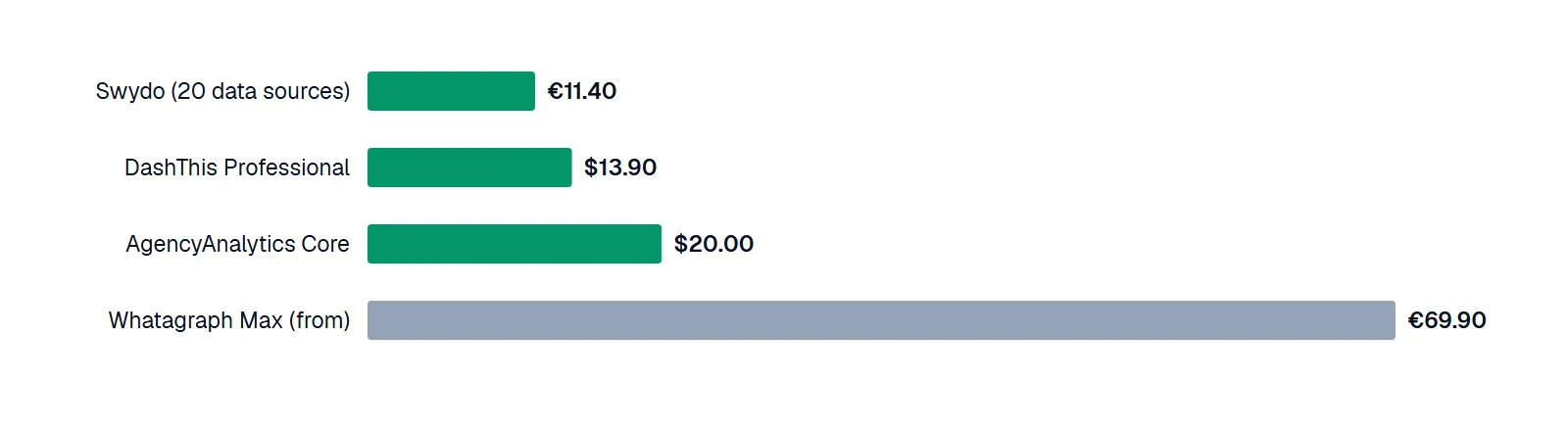
Cost per client at 10 clients, two ad accounts each, from public list prices; euro and dollar prices are shown as listed, not converted. Source: vendors' pricing pages, checked October 24, 2026.
Three patterns show up once the roster is fixed:
- Per-client pricing is flat. AgencyAnalytics costs $20 per client whether you have 5 or 25, which makes it the easiest to pass through to a client invoice.
- Bundle pricing rewards a full bundle. DashThis at 5 clients costs $27.80 per client because you pay for the 10-dashboard plan; at 10 clients the same plan costs $13.90.
- Credit pricing punishes small rosters. Whatagraph Max starts at 50 connected accounts. At 10 clients you use 20 of them and pay for 50.
Whether those prices include the white-label depth you need is a separate question, covered next. Your own numbers will differ with the number of data sources per client, monthly vs annual billing and any volume discount a vendor offers in a sales call. The same roster priced across eight tools, including Reporting Ninja, Databox and Data Studio, is in our AgencyAnalytics alternatives comparison.
What to check before you buy white-label reporting software
1. Branding depth, item by item
Ask which of the four levels the plan you are buying includes, and look for add-ons. Here is what each vendor's own pricing page lists:
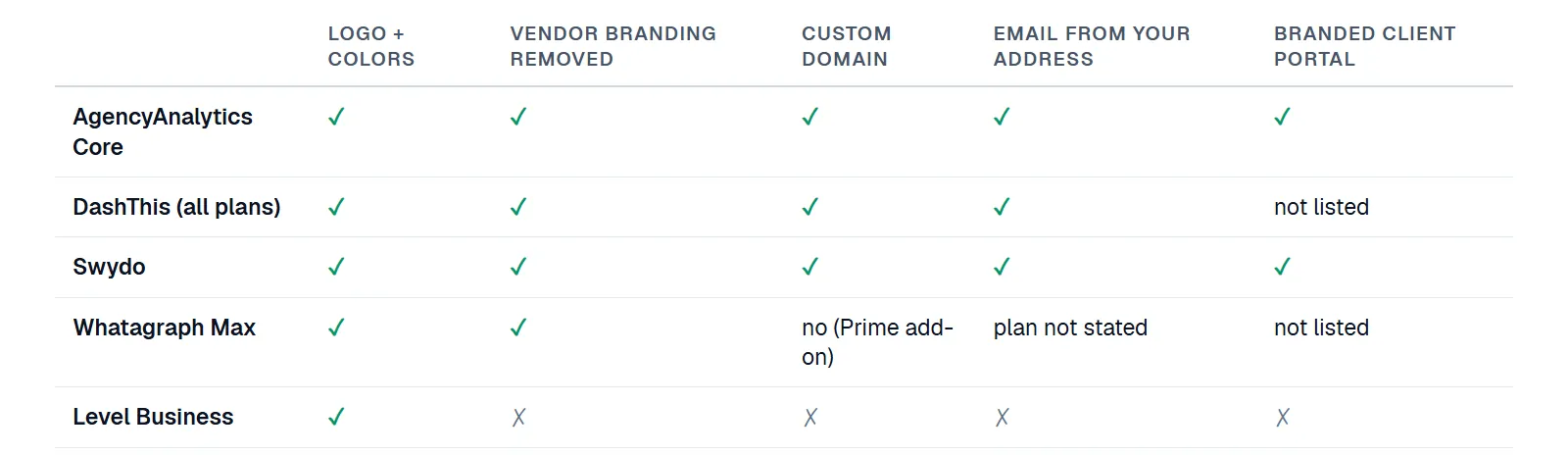
"Not listed" means the vendor's pricing and white-label pages do not mention it, not that the feature is missing. Source: vendors' pricing and white-label feature pages, checked October 24, 2026; Level's own docs.
| Tool | Logo + colors | Vendor branding removed | Custom domain | Email from your address | Branded client portal |
|---|---|---|---|---|---|
| AgencyAnalytics Core | Yes | Yes | Yes | Yes | Yes |
| DashThis (all plans) | Yes | Yes | Yes | Yes | Not listed |
| Swydo | Yes | Yes | Yes | Yes | Yes |
| Whatagraph Max | Yes | Yes | No (add-on on Prime) | On the feature page, plan not stated | Not listed |
| Level Business | Yes | No | No | No | No |
Whatagraph is the one case where two pages of the same vendor disagree: its white-label page says reports "live on your custom domain," while its pricing table marks the custom report domain "No" on Max and "Add-on" on Prime. Ask in writing before you sign.
2. Client logins
If clients will log in, check how access works: one login per client contact or a shared one, whether a client can see only their own dashboards, and what the login page and password-reset email look like. Ask who sends the password-reset email: a custom report sender does not always cover account emails, and that is where a vendor's name can still reach the client.
3. Scheduled delivery
Check the cadences (daily, weekly, monthly, last day of month), the time zone, whether the email body carries key numbers or just an attachment, and what happens when a data source has not synced yet: does the report wait, go out with gaps, or say that figures are incomplete?
4. Data-source coverage
Count the sources your clients actually use, then check each one: is it native or through a third-party connector, how often does it refresh, and does it count against your plan? A tool with 80 integrations is no help if the one CRM your biggest client uses is missing.
5. Per-client pricing at your size in 12 months
Run your roster today and your roster in a year through each pricing model, as in the table above. Then decide whether you pass the cost through to clients. A flat per-client price is easy to put on an invoice; a credit bundle is not.
How to set up white-label client reporting
Prepare brand assets
A transparent PNG or SVG logo, your hex colors, and a short "Prepared by" line. Keep one version per client if you co-brand with the client's logo.
Set up the domain and sender
For Level 3 and up, create a subdomain such as reports.youragency.com and point it at the vendor with the CNAME record they give you. If emails go from your address, add the vendor's SPF and DKIM records so reports do not land in spam.
Build one template, then clone it
Build one report for your most typical client, agree on the KPIs, and clone it. Our agency report template covers which sections belong in it.
Connect each client's sources and check the numbers
Connect the ad accounts and compare the first report against the platforms' own UIs for the same dates and attribution settings before anything goes to a client.
Schedule delivery and test it
Set the cadence and period, send a test to yourself, and open it the way the client will: in their email client, on a phone, and through the login page.
Disadvantages and pitfalls of white-label reporting
- The brand makes you liable for the numbers. When the report carries your logo, a double-counted conversion is your mistake in the client's eyes. White-labeling hides the vendor, so check the data before you scale delivery. Why most agency reports lie walks through the usual errors.
- Vendor UI patterns stay. Clients who log in see the vendor's layout and widgets with your colors. Anyone who has used the same tool elsewhere will recognize it.
- Support comes to you. Once the login page is yours, password resets and "the dashboard is blank" emails land in your inbox, not the vendor's.
- Lock-in. Templates, client logins and custom domains are hard to migrate. Switching tools later means rebuilding every client's reports.
- The branding is the easy part. Looking professional is not the same as telling the client what to do next. The difference between white-label and operator reporting is the difference between the envelope and the letter.
What Level supports for branded client reports
Level is an ad-reporting tool for Google Ads and Meta Ads. Its white-label depth is Level 1 to 2, as stated in its own docs:
- Branded PDFs. Each organization (one per client, typically) has its own logo and accent color, applied to every PDF export and scheduled report, with a "Prepared for" line and an optional cover page. Every page ends with a "Made with Level" line.
- Scheduled delivery on the Business plan: daily, weekdays, weekly or monthly, by email with the PDF attached and up to four key numbers in the email body, or to a Telegram chat. If an ad account has not synced the covered days, the report waits for it (6 hours by default, up to 12), then goes out marked as incomplete.
- Client access through email invitations and roles: you create a role and set dashboard access per role (no access, can view, can edit, full access). Sign-in happens at accounts.marketing-bar.com, not on your domain.
- No custom domain or custom email sender, and only two data sources: Google Ads and Meta Ads.
If your clients need Level 3 or 4, or reports across SEO, social and CRM data, one of the tools above fits better; our cross-channel dashboard guide sorts them by what they are built for. If they need ad numbers that are counted correctly every week, Level's Business plan covers five client organizations for $200 a month billed yearly. For a fully custom, branded reporting setup built around your stack, see our custom reporting service. If you are still choosing between platforms, our agency dashboard tools comparison covers fit by agency type.
Five vendors' price lists, checked October 24, 2026
Prices and white-label features are taken from each vendor's public pricing page and, where the pricing page is silent, its white-label feature page, checked on October 24, 2026: AgencyAnalytics, DashThis, Swydo, Whatagraph and Level. Between our first check on October 9 and this one, Whatagraph Max dropped from €999 to €699 a month; the other four prices did not change. Level's features come from its public docs. The search-result breakdown is one DataForSEO pull for "white label reporting," US desktop, October 24, 2026, 9 organic results. We opened the three agency guides; the other six are classified by URL, title and snippet. We used the price each page shows by default: annual billing for AgencyAnalytics, DashThis, Whatagraph and Level, monthly for Swydo. The scenario assumes one dashboard and two ad accounts per client, and treats one connected ad account as one Swydo data source and one Whatagraph credit. We did not convert euros to dollars. Sales-negotiated discounts, add-ons and taxes are excluded. Prices change; check the vendor's page before you buy.
FAQ
Reports, dashboards and report emails produced by a third-party tool but delivered under your agency's brand. Depending on the tool, that covers your logo and colors, your domain, your email sender and a client login page.
On public pricing checked October 2026, about €10 to €70 per client per month. For 10 clients with two ad accounts each: Swydo €11.40, DashThis $13.90, AgencyAnalytics $20 and Whatagraph Max from €69.90 per client.
No. White-label rights are a feature the vendor sells you as part of the subscription. Read the vendor's terms for what you may remove and how you may describe the tool, and be accurate with clients if they ask who builds your reports.
An agency sends a monthly PDF with its own logo and colors, emailed from reports@youragency.com, with a link to a dashboard on reports.youragency.com. A reporting vendor generates all of it; the client sees only the agency.
You own the support load and any data error under your brand, clients may recognize the vendor's interface, and migrating branded templates and client logins to another tool is slow.
A logo swap changes what is on the report. A custom domain changes where it lives: the client opens reports.youragency.com instead of a vendor URL. Of the five tools compared above, all offer the logo; Level and Whatagraph Max do not include a custom domain.