Placements
A placement wires one ad account on one platform into one client. It's how Level knows which numbers to pull for a given report.
A placement is the link between "this ad account on Google Ads / Meta" and "this Level client." No placements = no data; once you've added one, Level starts pulling its campaign performance and keeps it fresh.
You manage placements per client at the Placements page.
What a placement is
Each placement holds:
- A name you choose (e.g. Acme · Google Search, Acme · Meta Reels).
- A platform — Google Ads or Meta.
- A link to a connected account — which OAuth login Level uses to read it.
- The actual ad account under that login.
- A currency — inherited from the ad account; you don't pick it.
- A status — where Level is in pulling its data.
What you'll see
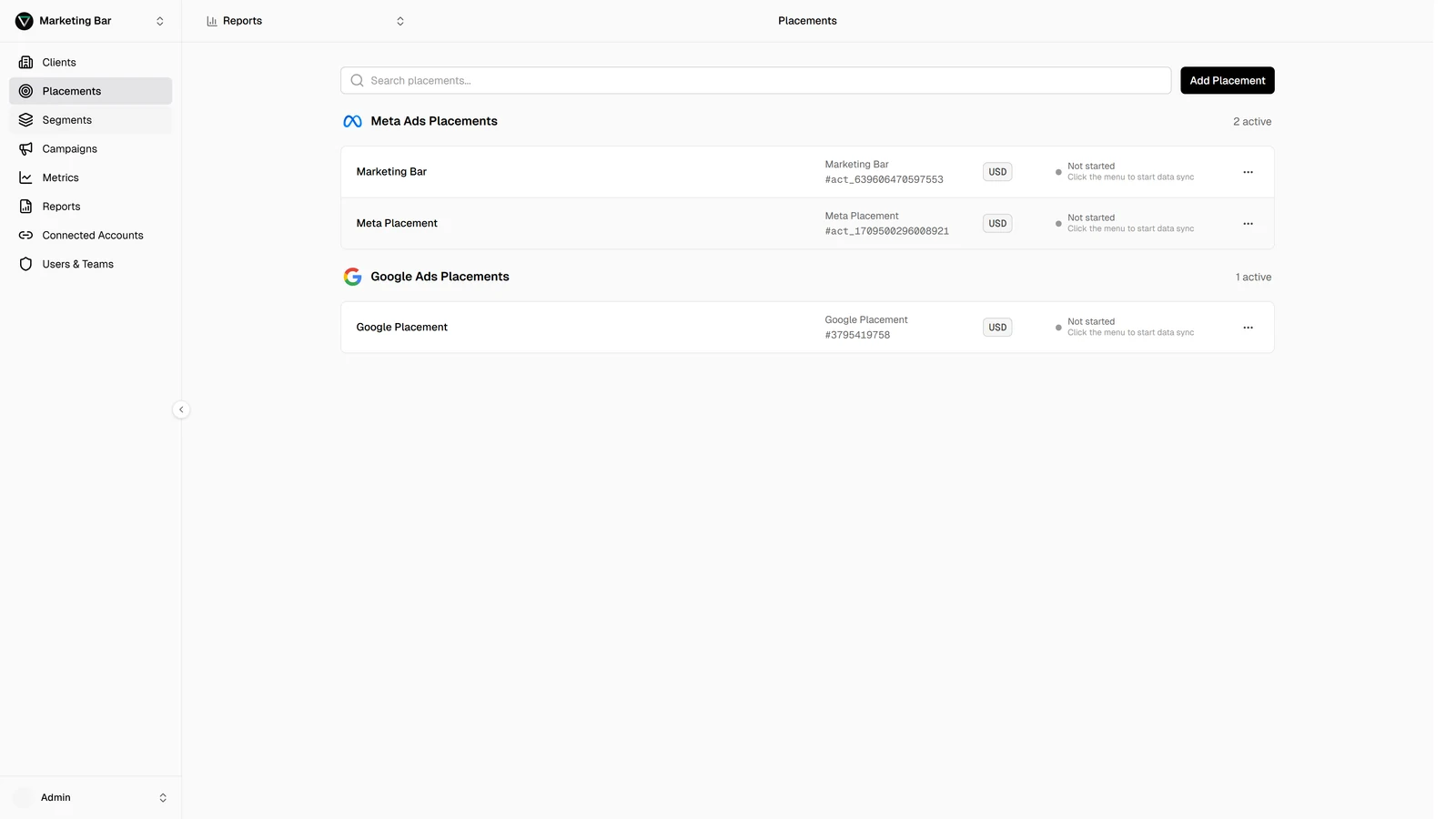
The placements page groups rows by platform: Meta Ads first, then Google Ads. For each placement you see:
- Name.
- Account — the ad account name and its identifier.
- Currency — a small badge.
- Status — a pill showing the current sync state (see below).
- Actions — Edit, Start / Stop / Retry (depending on current state), and Delete.
Above the table: Search (matches name, account name, or identifier) and Add to create a new placement. On mobile the same list renders as cards.
Status
The pill on each row tells you exactly where the placement is:
| Status | Meaning |
|---|---|
| Not started | Placement exists but no sync has run yet. |
| Initial load scheduled | First-time backfill is queued. |
| Initial load running | First-time backfill is pulling historical data. |
| Initial load failed | First-time backfill hit an error; click Retry to try again. |
| Active | Healthy and up to date. |
| Running | A scheduled refresh is in progress. |
| Failing | A recent refresh failed; Level is still retrying on schedule. |
| Backfill running | Filling a historical gap (e.g. after a reconnect). |
| Backfill failing | A backfill chunk hit an error. |
| Stopped | You (or an admin) paused syncs for this placement; click Start to resume. |
Status updates in real time — no need to reload.
For the deeper view of what each status implies and how often Level pulls data, see Data sync.
Creating, editing, deleting
- Creating a placement — pick the connected account, pick the ad account, name the placement.
- Managing placements — edit the name, start/stop syncs, delete a placement.
Permissions
Placement actions follow the same role model as the rest of the app. If your role grants placement management on the active client, you'll see the Add / Edit / Delete / Start / Stop / Retry actions; if not, you see the list read-only.